
An FTP client built specifically for Leopard
Flow is a smart new FTP client for transferring files built specifically to use the new features found in Leopard.
The applications supports FTP, SFTP, WebDAV, .Mac and local connections and lets you carry out multiple transfers at once. Although it doesn't offer tabbed views, which I find absolutely necessary when working with different connections at once, it uses QuickLook to visualize files quickly in your Finder.
The interface is clean and simple, giving you the transfer rate for each file and a little progress bar to let you know has much has been uploaded/ downloaded. Programmers will enjoy having a built-in editor to modify code
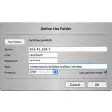
The best feature of Flow surely is dropmarks. After creating a droplet in Flow, all you'll have to do is drag any file onto it to transfer it. Easy as pie!
Although it doesn't offer tabbed views, Flow is a smart new FTP client that makes great use of Leopard technology. Dropmarks are an excellent way of transferring files.
[New] The tab and window title now contains the directory you're currently in, for better context with multiple tabs.[New/Fixed] If you don't have a base URL set, the Open URL / Copy URL functionality will now prompt you to set the base URL instead of simply being unavailable.[New] The info view now displays the modification time of the selected file.[Fixed] Drawing glitch with Flow's editor's split-view.[Fixed] Issue with QuickLook and multiple tabs.[Fixed] Issue with FTP listings and transfers with files whose name contained non-ASCII characters (i.e., German, Norwegian, etc.).[Fixed] Issue where base URL could not be unset.[Fixed] Issue where new files could not be created on S3 connections.
Changes
[New] The tab and window title now contains the directory you're currently in, for better context with multiple tabs.[New/Fixed] If you don't have a base URL set, the Open URL / Copy URL functionality will now prompt you to set the base URL instead of simply being unavailable.[New] The info view now displays the modification time of the selected file.[Fixed] Drawing glitch with Flow's editor's split-view.[Fixed] Issue with QuickLook and multiple tabs.[Fixed] Issue with FTP listings and transfers with files whose name contained non-ASCII characters (i.e., German, Norwegian, etc.).[Fixed] Issue where base URL could not be unset.[Fixed] Issue where new files could not be created on S3 connections.





























User reviews about Flow
Have you tried Flow? Be the first to leave your opinion!